

A bank feed can bring transactions into view sooner, but it does not replace checking that the records match. Cloud bookkeeping in Singapore uses online accounting software to record business activity, access financial data over the internet and import transactions from connected bank accounts. Bookkeeping classifies and records transactions; reconciliation compares bank activity with accounting entries and helps identify mismatches.
It is understandable to expect a connected bank account to remove manual bookkeeping work. A feed can import transactions into the software, but someone still needs to review how they are recorded and resolve unmatched items. This guide explains what cloud accounting involves, how bookkeeping and bank reconciliation work together, and how Singapore bank feeds connect with your accounts, so you can see what the software handles and where careful review remains important.
Key Takeaways
- Cloud accounting keeps financial records accessible online and can bring bank transactions into one place for review.
- Bank feeds import transaction data, while reconciliation checks that the records match bank activity and helps surface discrepancies.
- Consistent transaction classification makes it easier to understand cash flow and prepare reliable financial reports.
- Singapore’s standard GST rate is 9%, according to the Inland Revenue Authority of Singapore; accurate transaction records help support GST accounting.
What is cloud accounting?
Cloud accounting stores business records in online software, linking transaction entry, reporting and access to financial data. For Singapore businesses, its value depends on accurate setup, suitable controls and records that support local filing requirements.
Cloud-Based Financial Data Access
Cloud-based accounting lets authorised users access financial data remotely on an internet-connected device. Directors and finance staff can review the same records without relying on one office computer. For example, a growing company can review recorded expenses while its team works in different locations. Before switching, plan the data migration: organise existing records, map accounts to the new system, transfer opening balances and review sample transactions. A clean migration makes subsequent reporting more useful.
Real-Time Reporting and Bank Feeds
Bank feeds import transaction details from a connected business bank account into accounting software, while reports summarise recorded activity. A feed can reduce manual entry, but it cannot determine whether a transaction is income, an expense or a transfer. Review imported items, match them to invoices or receipts, and correct classifications. This gives directors a clearer view of cash movements for decision-making, while still requiring entries to be reconciled against bank activity.
Software Options and Singapore Requirements
Cloud accounting options vary in bank-feed connections, invoicing, expense tracking, reporting and integration with other business systems. Choose software that fits how the company records transactions and supports its Singapore filing processes. Singapore’s standard GST rate is 9%, according to the Inland Revenue Authority of Singapore. The Inland Revenue Authority of Singapore also requires all remaining GST-registered businesses to comply with the InvoiceNow rollout from 1 April 2031. ACRA XBRL preparation is another consideration: structured, consistent accounting data can make financial statement preparation more orderly when XBRL filing applies.
Provider Choice, Costs, and Data Risks
Choose a provider by assessing its Singapore accounting knowledge, migration process, reporting capabilities, bank-feed workflow and support for relevant filing tasks. Consider security, privacy and data residency: who can access records, how access is controlled, how data is backed up and where it is stored. To compare costs, look at what the subscription covers, user access, transaction volume, migration and support. These factors help you assess fit without making the lowest fee the only measure.
Bookkeeping and bank reconciliation
For a Singapore business, bookkeeping organises invoices, receipts and bank activity into accounting records. Reconciliation compares those records with the bank statement, helping identify missing entries, duplicates and timing differences before they affect reports.
How bank-feed reconciliation works
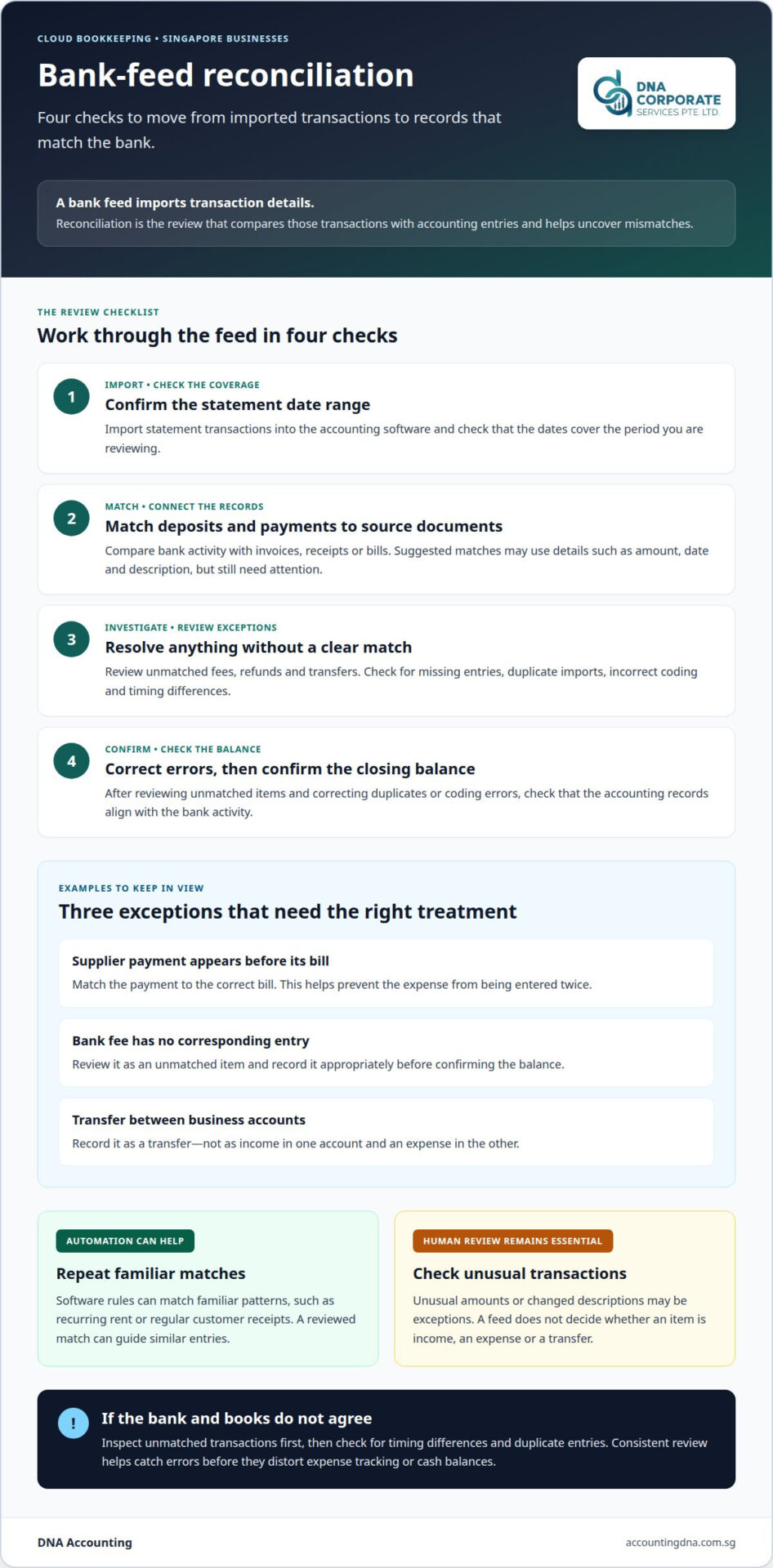
A bank feed imports transactions into accounting software, where the system may suggest matches based on details such as amount, date and description. A payment that matches an open customer invoice can be recorded as settled; a bank fee without a corresponding entry needs separate review. The import saves manual data entry, but suggested matches still need attention.
A practical review can follow this sequence:
- Import the statement transactions and check the date range.
- Match deposits and payments to invoices, receipts or bills.
- Review unmatched items, such as fees, refunds or transfers.
- Correct duplicates or coding errors, then confirm the closing balance.
For example, a supplier payment may appear in the bank feed before the bill is recorded. Matching it to the correct bill prevents the expense from being entered twice. A transfer between business accounts should also be recorded as a transfer, not as income in one account and an expense in another.
What automation can and cannot do
Automated reconciliation uses software rules to match familiar transaction patterns, such as recurring rent or regular customer receipts. After reviewing a match, a bookkeeper can apply the same rule to similar entries. This can reduce repetitive work, while unusual amounts and changed descriptions remain exceptions that need human review.
Errors often come from incorrect coding, duplicate imports or transactions posted to the wrong account. Regular reviews help catch these problems before they distort expense tracking or cash balances. If the bank statement and accounting records differ, inspect unmatched transactions first, then check for timing differences and duplicate entries.
Cloud bookkeeping in Singapore works best when the feed is reviewed as part of a consistent bookkeeping routine, not treated as a complete accounting process. If a feed repeatedly imports duplicate or incomplete entries, review the connection and reconciliation workflow. For help keeping records aligned, discuss your bookkeeping needs.
DNA Accounting: Accounting & Bookkeeping
DNA Accounting supports Singapore businesses that need consistent bookkeeping, clearer financial records or help managing accounting tasks as they grow. Its Accounting & Bookkeeping service helps organise transaction records and prepare useful information for business decisions.
Consider professional support if bank-feed entries remain unreconciled, expense classifications are inconsistent or year-end records are difficult to assemble. Where GST obligations apply, DNA Accounting also provides GST Services, helping businesses manage bookkeeping and GST work together. Taxation Services are available for related tax needs.
For a practical discussion about your bookkeeping needs, contact DNA Accounting.
Make your bookkeeping process work for your business
As your Singapore business grows, review whether your bookkeeping routine still fits how invoices, expenses and approvals move through the company. A process review can clarify who records transactions, who checks exceptions and when management needs updated figures. These decisions help shape cloud bookkeeping in Singapore around your team’s workflow, rather than letting software settings dictate it.
If reconciliations are falling behind or financial information is hard to use for planning, reviewing your Singapore cloud bookkeeping setup can be a practical next step. Consider what information your team needs to make decisions, who should review it and how often to revisit the process as operations change.
Contact DNA Accounting to discuss a suitable next step for your business.
Frequently Asked Questions
What is cloud bookkeeping and how does it work in Singapore?
Cloud bookkeeping records a Singapore business’s financial activity in online accounting software. For example, when a company issues an invoice and later receives payment, the records can show both the sale and its settlement. Staff can review the information remotely, while access controls help limit who can view or change entries. The business still needs a clear process for checking unusual transactions and keeping supporting documents.
What are Singapore’s bookkeeping and record-keeping requirements for businesses?
Companies in Singapore must maintain accurate accounting records to comply with the Companies Act, according to the Accounting and Corporate Regulatory Authority (ACRA). In practice, keep records that explain transactions, including sales invoices, supplier bills, receipts and bank statements. A director reviewing a payment should be able to trace it from the bank entry to its supporting document and accounting entry.
How do cloud bookkeeping platforms handle Singapore GST filing and tax reporting?
Cloud platforms can organise transaction data and generate reports for GST and tax preparation, but figures still need to be checked against invoices and other source records. Singapore GST returns can be filed through myTax Portal, according to the Inland Revenue Authority of Singapore (IRAS). Before using software reports to support a return, check that sales and purchase records for the filing period are complete. GST filing must be accurate and on time; failure to do so results in penalties.
What are the steps to move a Singapore business’s bookkeeping to the cloud?
Start by choosing a cutover date and listing the records and systems the business currently uses. Map existing account categories to the new software, enter opening balances and check them against prior records. Configure user access and reporting needs, test a sample of transactions, and review the resulting reports. Keep prior records accessible so the business can trace older entries when needed.
What are the security, privacy, and data residency risks of cloud bookkeeping in Singapore?
When choosing a provider, consider who can access records, how access is controlled, how data is backed up and where it is stored. These are key security, privacy and data residency considerations.
Disclaimer
The information provided on this website is for general informational purposes only and is not intended to constitute professional accounting, tax, legal, or financial advice. While we strive to ensure that the content is accurate and up to date, regulations in Singapore, including those administered by ACRA, IRAS, CPF Board, and MOM, may change from time to time and may differ depending on individual circumstances.
Readers should not act or rely on any information contained on this website without seeking specific advice from a qualified professional based on their individual situation.
DNA Corporate Services and its affiliates accept no responsibility or liability for any loss or damage arising from reliance on the information provided in this website or any linked materials.
For tailored advice relating to accounting, taxation, corporate secretarial, or compliance matters in Singapore, please contact us directly for professional consultation.



