
For a Singapore small business, the benefits of cloud accounting include access to up-to-date financial information and the ability to share records with authorised users wherever they have an internet connection. Rather than keeping files on one computer, a business manages its books through online accounting software. Automation can reduce repetitive work, but accurate reporting still depends on sound processes and regular review.
It’s understandable to want simpler bookkeeping without losing sight of cash flow, tax records or business decisions. This article explains how cloud accounting works, where automation can help with financial reporting, and what to consider when choosing a provider, including how the system supports your Singapore business’s GST, IRAS and ACRA requirements.
The right setup should make routine finance work clearer, not add complexity. You’ll learn which features matter, what to assess around security and access, and when a more tailored accounting approach may be useful.
Key Takeaways
- Understand how online access lets business owners and authorised users work with financial records from different locations.
- See where automating tasks such as invoicing and bank reconciliation can make reporting more timely, while review remains important.
- Assess a provider’s security, user access controls, integrations and ability to support your business as it grows.
- Consider how bookkeeping support can help keep your accounts organised alongside Singapore GST and tax needs.
What is cloud accounting?
Cloud accounting stores financial data online so authorised users can access it over the internet. The National Institute of Standards and Technology (NIST) describes cloud computing as on-demand network access to shared computing resources. For Singapore businesses, a key benefit of cloud accounting for small business owners is working with shared records instead of files tied to one office computer.
Remote Access Across Devices
Cloud accounting platforms let users view records on internet-connected devices. A director can review a supplier invoice away from the office while a bookkeeper updates the accounts. This supports collaboration across locations and gives the team a shared set of financial data, rather than separate desktop files that colleagues must pass between them.
Always-On and Real-Time Information
Cloud platforms can synchronise transactions and ledgers across user sessions, making current financial information available to authorised users. A business owner can review sales before deciding whether to follow up on unpaid invoices or adjust spending. Timely records can help inform decisions as the business plans for growth, a principle long championed by accounting and advisory specialists like Business Wise when guiding expanding commercial operations.
Cloud and Desktop Accounting
Desktop accounting software is installed and used on a specific computer, while cloud accounting is accessed through online platforms. Cloud access can support remote collaboration, but it requires an internet connection and secure account access. The University of Cambridge notes that cloud services can raise legal and regulatory concerns involving contracts and data protection.
Digital Records and Tax Filing
For Singapore tax filing, cloud software can help organise financial data, but it does not replace preparing and submitting the required information to IRAS. Keep transaction details and supporting documents organised so reported figures can be traced back to records. Reviewing entries helps ensure reports reflect the business’s actual transactions.
Automation and more accurate financial reporting
Automation can reduce manual bookkeeping and help keep reports current as transactions accumulate. It works best when business owners set clear rules and review exceptions.
Automated Bookkeeping and Invoicing
Accounting software can apply saved details and rules to recurring invoices and routine transaction entries. For example, a business can standardise invoice descriptions for repeat services, making records easier to compare across periods. Staff should still review unusual amounts, changed customer details and unpaid invoices. This combination helps keep the books consistent without treating automated entries as error-proof.
Expense Tracking and Bank Reconciliation
Expense tools can sort spending records, while reconciliation features help compare entries with bank activity. A finance manager might investigate a bank-feed payment with no matching receipt. Resolving mismatches before closing the books gives reports a stronger basis. Clear expense categories also help directors see which costs have changed, much like how specialised cloud platforms such as PropAlly help investors monitor cash flow, expenses, and tax records across individual assets.
Accounting Task Automation
Businesses can configure software for repeatable steps, such as assigning transaction categories or routing invoices for approval. For payroll workflows, confirm which tasks the system supports and review calculations before processing. Update workflow rules and user permissions as responsibilities change. This keeps automation aligned with current business procedures rather than outdated settings.
More Accurate Financial Reporting
Consistent entries can make period reports easier to review, but automation cannot correct inaccurate source data. Bank and payment platform integrations depend on each system’s supported connections. Cloud accounting software does not, by itself, submit tax returns to IRAS. For assistance aligning bookkeeping processes with reporting needs, discuss your accounting requirements.
Choosing a cloud accounting provider
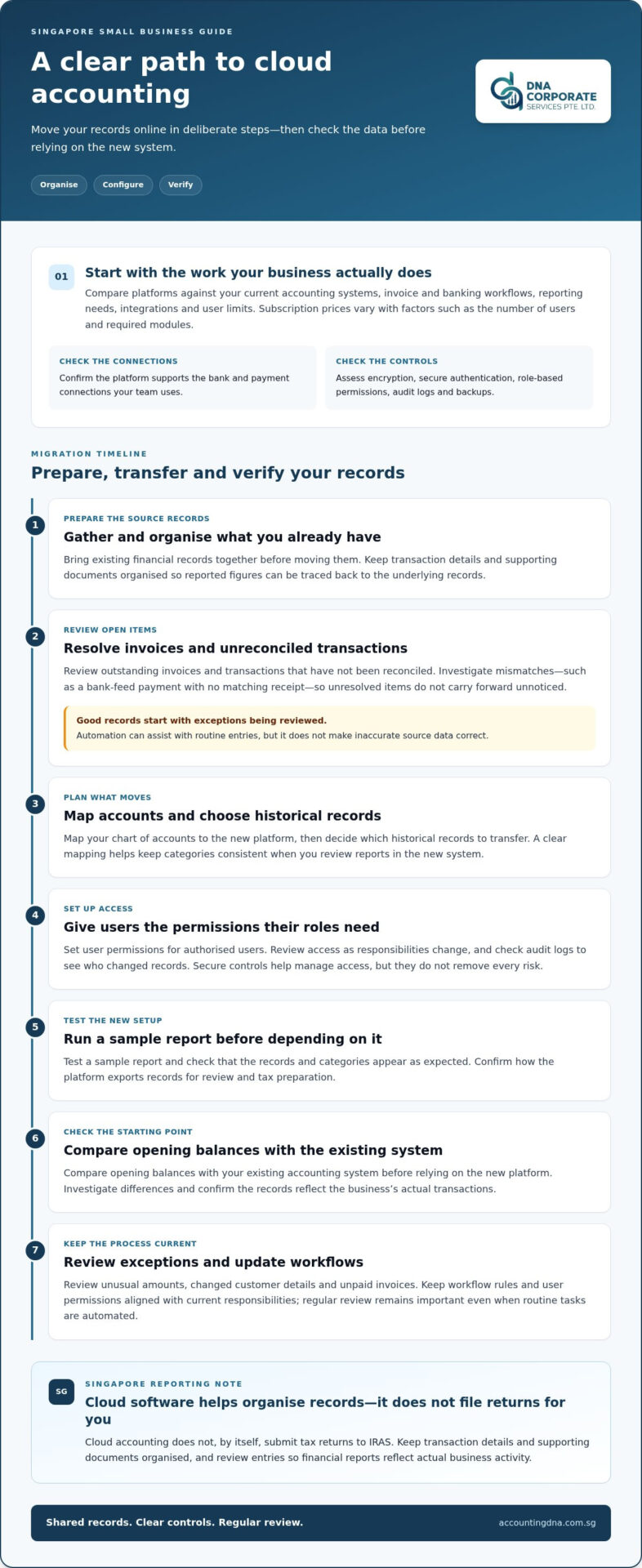
Choose cloud accounting software that fits your Singapore business’s daily work. Start with the accounting systems you already use, then assess whether a platform can streamline invoices, bank feeds and reporting. Before moving financial records online, check access controls, backups and support for remote users.
Security deserves close attention. Look for encryption, secure user authentication, role-based permissions and audit logs showing who changed records. These controls help manage access, but they do not remove every risk. The University of Cambridge notes that cloud services can raise legal and regulatory concerns involving contracts, data protection and sensitive information.
How much does cloud accounting software cost for small businesses in Singapore? Subscription prices vary with factors such as the number of users and required modules. Compare included features, integration needs and user limits rather than judging a plan by its starting price alone.
How can a small business migrate to cloud accounting software? First, organise existing records and review outstanding invoices and unreconciled transactions. Then map your chart of accounts and decide which historical records to transfer. Set user permissions, test a sample report, and compare opening balances with your existing system before relying on the new platform.
For Singapore operations, assess whether the system supports the payment and banking workflows your team uses. Confirm how it exports records for review and tax preparation; software integration does not itself submit returns to IRAS. A business based on remote work may value anytime access, while a growing team may prioritise user permissions and integrations. To discuss how bookkeeping requirements affect your selection decisions, speak with an accounting professional.
DNA Accounting: Accounting & Bookkeeping
DNA Accounting provides Accounting & Bookkeeping support for Singapore businesses that need organised records and clearer financial reporting. Turn to the team when transaction tracking, account reviews or preparing records for tax work take time away from running your business.
When your accounting needs extend beyond bookkeeping, DNA Accounting also provides GST Services, Taxation Services and Corporate Secretarial Services. Coordinating these requirements can help directors manage financial records alongside their Singapore compliance responsibilities. The right support depends on your business’s transactions, reporting needs and current processes.
For help with your accounting needs, contact DNA Accounting.
Make your next finance decision with confidence
Start by deciding which finance tasks should become easier: keeping transaction records current, preparing reports or coordinating tax work. Map those needs against your existing workflow, then choose a setup that supports accurate decisions without adding unnecessary steps. The benefits of cloud accounting for small business owners matter most when the system fits their operations and its records are reviewed consistently.
DNA Accounting offers Accounting & Bookkeeping, GST Services and Taxation Services to help directors maintain organised records and prepare financial information for Singapore tax work.
Contact DNA Accounting to discuss cloud accounting and take a considered next step towards a finance process that works for your business.
Frequently Asked Questions
Will accounting software save me time?
It can, especially when your team agrees on who records transactions and who reviews them. For example, a monthly close checklist can assign responsibility for checking supplier bills, customer receipts and unusual balances. Without clear ownership, software may simply shift unfinished work into a digital system. Review your process after a reporting period to identify steps that still cause delays.
What are the main benefits of cloud accounting for small businesses?
Beyond routine bookkeeping, a well-managed system can make handovers easier when a finance employee or external bookkeeper changes. Consistent account names and transaction descriptions help the next person understand past entries without relying entirely on someone’s memory. For a Singapore startup preparing management accounts, that continuity can make it easier to explain how figures were recorded and reviewed.
How does cloud accounting save time on bookkeeping and financial reporting?
To make month-end work more efficient, set a regular cut-off for submitting receipts and recording transactions. The person preparing reports can then focus on unresolved items instead of searching through scattered documents. Comparing actual spending with the business budget can also highlight material changes and help directors prepare focused questions for their finance review.
How secure is cloud accounting software, and how is financial data protected?
Ask how the provider handles data retention and export if your business later changes systems. Confirm that your team can retrieve records in a usable format and that access can be removed when a staff member leaves. Read the service agreement’s provisions on data handling and account termination, too. These practical checks complement technical safeguards and help preserve continuity.
What should a Singapore small business look for when choosing cloud accounting software?
Test a realistic transaction before committing, such as recording a customer refund or correcting an invoice. If your company handles GST, assess whether the software clearly records relevant tax details for review and return preparation. Check that reports use account categories directors understand and that staff can export records for analysis or handover without rebuilding them manually.
Disclaimer
The information provided on this website is for general informational purposes only and is not intended to constitute professional accounting, tax, legal, or financial advice. While we strive to ensure that the content is accurate and up to date, regulations in Singapore, including those administered by ACRA, IRAS, CPF Board, and MOM, may change from time to time and may differ depending on individual circumstances.
Readers should not act or rely on any information contained on this website without seeking specific advice from a qualified professional based on their individual situation.
DNA Corporate Services and its affiliates accept no responsibility or liability for any loss or damage arising from reliance on the information provided in this website or any linked materials.
For tailored advice relating to accounting, taxation, corporate secretarial, or compliance matters in Singapore, please contact us directly for professional consultation.



