

Migrating to Xero from spreadsheets in Singapore typically takes one to four weeks. A smooth transition starts with preparing accurate opening balances and transaction records, then importing the relevant data and checking that the results match your existing books.
Spreadsheets may suit a small operation, but manual updates, overwritten formulas and multiple file versions can make records harder to manage as a business grows. A structured migration helps you move accounts without losing track of key information.
This guide covers how to organise records, import contacts and transactions from CSV files, and validate your Xero setup before using it day to day. It also explains what to retain in your spreadsheet archive and how consistent bookkeeping supports clearer financial records.
Key Takeaways
- Clean and organise your contact and transaction data before importing it to reduce duplicate or inaccurate records.
- Build opening balances from reconciled accounts, and keep supporting documents and spreadsheet backups for reference.
- Standardise account categories and tax codes to make reporting more consistent as your business grows.
- DNA Accounting’s Accounting & Bookkeeping support can help you manage your records and maintain an orderly transition to Xero.
Importing contacts, invoices, bills, and transactions from CSV files
For Singapore SMEs migrating to Xero from spreadsheets, prepare separate CSV files for each record type. Xero can record GST-coded transactions for IRAS reporting when tax codes are mapped and reviewed. The Inland Revenue Authority of Singapore says the GST InvoiceNow requirement is being phased in for GST-registered businesses through 2031.
-
Prepare CSV Files for Import
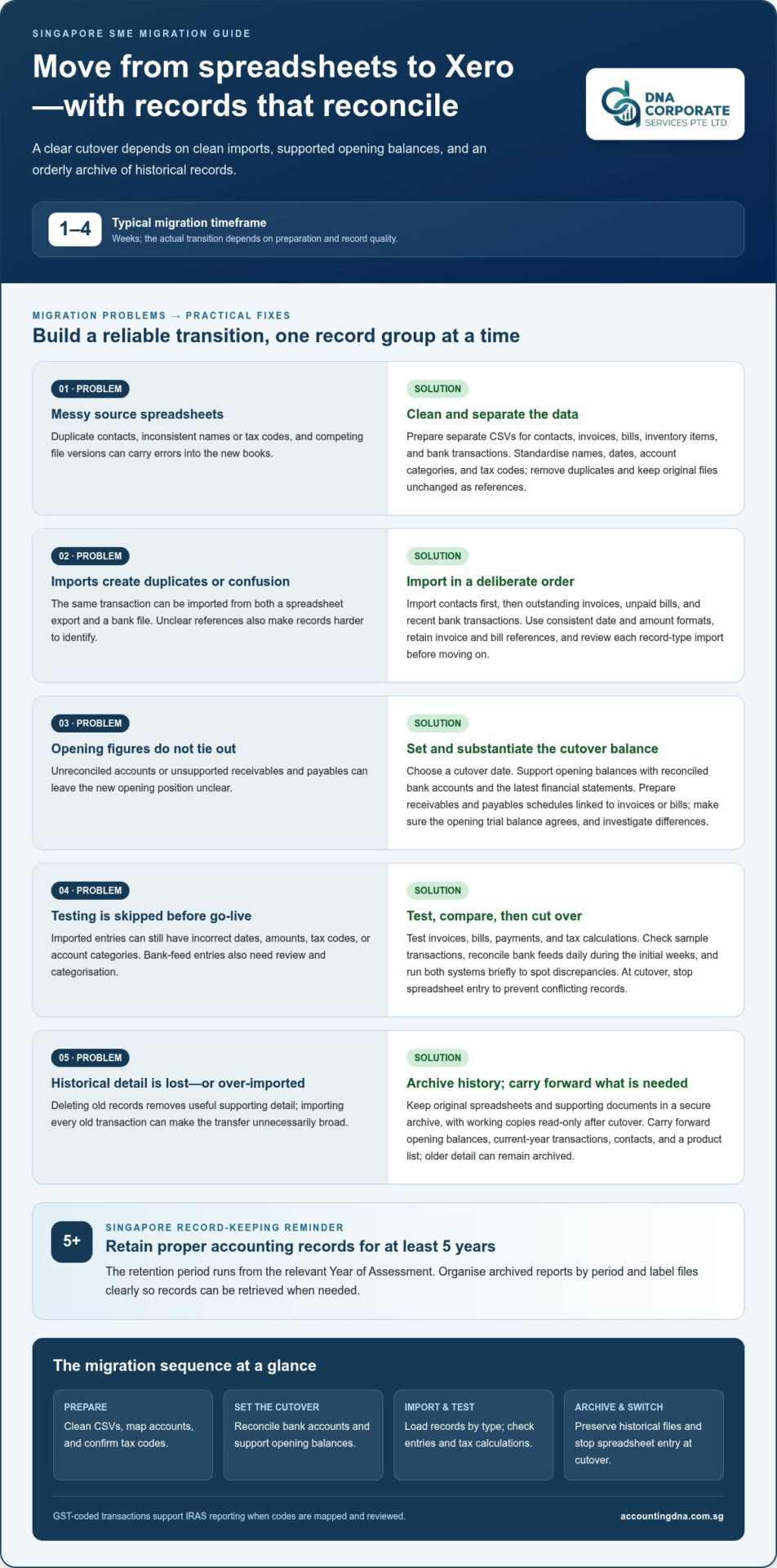
Export contacts, invoices, bills, inventory items and bank transactions into separate CSV files. Before importing, standardise names, dates, account categories and tax codes. Remove duplicate contacts and resolve differences between spreadsheet versions. For example, link each customer invoice to a single contact record and separate business transactions from owners’ personal spending. Keep the original files unchanged as migration references.
-
Transfer Invoices, Bills, and Transactions
Import contacts first, followed by outstanding invoices, unpaid bills and recent bank transactions. Use consistent date and amount formats, and retain invoice and bill references so records remain identifiable. Avoid importing a transaction twice from a spreadsheet export and a bank file. For larger transfers, separate files by record type and review each import before continuing.
- Test invoices, bills, payments, and tax calculations before go-live. Review sample transactions for dates, amounts, tax codes, and account categories. Xero bank feeds bring transactions into the bookkeeping workflow, but each entry still needs review and categorisation. Reconcile bank feeds daily during the initial weeks, comparing balances with previous records. A typical Singapore SME migration takes one to four weeks. Run both systems briefly to spot discrepancies, then stop spreadsheet entry at cutover to prevent conflicting records.
Preparing opening balances and transaction records
Set a cutover date and assemble the records needed to support reliable opening balances. A clear preparation file explains adjustments and provides a useful audit trail for the business.
-
Clean and Map Historical Records
Review historical data for duplicate entries, missing supporting documents, personal spending and inconsistent account names. Compare spreadsheet totals with bank statements and financial statements to catch errors. Standardise account labels, then map each account to the appropriate Xero category and tax code. Record adjustments and the reasons for them, so owners can trace how the new reports relate to source records.
-
Prepare Opening Balances and Outstanding Items
Use the cutover date to establish the opening position, supported by reconciled bank accounts and the latest financial statements. Prepare schedules of receivables and payables, with each amount linked to its supporting invoice or bill. The opening trial balance should agree with these schedules. Investigate differences before finalising the figures, so the opening position is clear without importing every historical transaction.
-
Keep Historical Spreadsheet Records
Preserve the original spreadsheets and supporting documents in a secure archive, and make working copies read-only after cutover. Singapore businesses must retain proper accounting records for at least 5 years from the relevant Year of Assessment. Organise historical reports by period and label files clearly, so business owners can retrieve records for later questions without treating archived spreadsheets as current books.
A spreadsheet-to-Xero migration generally requires opening balances at the cutover date, current-year transactions, contacts and a product list. Older detail can remain archived. If you need historical comparisons, use opening adjustments rather than re-importing every old transaction. This keeps the transfer focused on the information needed for the new books while preserving access to earlier records.
Before migrating, identify outstanding receivables and payables, reconcile bank accounts, and confirm opening balances against the latest financial statements. Make sure supporting documents are available so you can carry forward or retrieve the records needed to substantiate balances and transactions. Securely archive historical accounting records rather than deleting them after the move to Xero.
Benefits of replacing spreadsheets with accounting software
For Singapore businesses, migrating to Xero from spreadsheets can replace fragile manual updates with a more structured bookkeeping workflow. The benefits depend on using clear account categories and reviewing entries regularly.
- Review the risks in your current format. Check whether owners rely on one spreadsheet version or circulate several copies. Overwritten formulas and manual report updates can hide errors in financial data. Excel can suit a startup tracking income, expenses, and basic cash flow, but duplicated files make consistent reporting harder. Note where staff repeat calculations or copy figures between reports.
- Build a chart of accounts for useful reports. Standardise account names, then map each account to the right category. For example, separate sales, operating expenses, and payroll costs instead of combining them under “general expenses.” Map appropriate tax codes to accounts so GST reporting uses consistent classifications. A well-organised structure makes reports easier to interpret.
- Connect the setup to business needs. Use tracking categories to compare projects or business activities in reports. Keep each category purposeful, since unnecessary categories make financial data harder to interpret. Match the chart of accounts to opening balances for a coherent starting structure. Bank feeds can reduce manual entry by bringing transactions into the accounting workflow.
- Choose the right level of review. A business with clean records and straightforward accounts may manage the transfer internally. An accountant or bookkeeper can review inconsistent records, higher transaction volumes, or coordination between GST and payroll records. Ask the reviewer to assess account mapping, sample reports, and reconciliation procedures before routine use.
As a business grows, spreadsheet accounting becomes more vulnerable to manual reporting errors and overwritten formulas. Multiple versions of the same file circulating internally can signal that the business has outgrown its current process. Map appropriate tax codes to chart-of-accounts entries to keep classifications consistent.
DNA Accounting: Accounting & Bookkeeping
DNA Accounting provides Accounting & Bookkeeping support for Singapore businesses moving records from spreadsheets into accounting software. The team can help organise transaction records and maintain consistent books, with bookkeeping connected to GST and tax requirements.
Accurate bookkeeping gives directors a clearer view of business activity and keeps financial records organised for reporting. DNA Accounting also provides GST Services, Taxation Services and Corporate Secretarial Services to support related accounting and compliance needs.
If you’d like support with your bookkeeping, contact DNA Accounting to discuss your requirements.
Make Your Next Finance Process More Reliable
A well-planned migration to Xero from spreadsheets in Singapore does more than change where transactions are recorded. It gives your team a consistent process for reviewing financial activity, assigning responsibility and raising questions before month-end. Assign an internal owner for Xero and agree how staff will handle new transactions, corrections and supporting documents. These routines help keep the system useful after the initial transfer.
DNA Accounting offers Accounting & Bookkeeping, GST Services, and Taxation Services to support Singapore businesses with connected finance needs. Regularly reviewing reports can help directors use current information as they plan cash flow and operational decisions. If you want guidance on the next step for your records, contact DNA Accounting to discuss your migration. A steady, well-understood process can help your team move forward with confidence.
Frequently Asked Questions
What are the risks of migrating during a financial year or near a GST filing deadline?
Migrating mid-year can split transaction records across two systems, making it harder to identify the entries relevant to a GST return. Near a filing deadline, unresolved tax-code differences or missing source documents can delay review and increase the risk of inaccurate figures. Keep the filing workflow clear, reconcile the relevant period, and ensure GST returns are completed accurately and on time for IRAS.
Disclaimer
The information provided on this website is for general informational purposes only and is not intended to constitute professional accounting, tax, legal, or financial advice. While we strive to ensure that the content is accurate and up to date, regulations in Singapore, including those administered by ACRA, IRAS, CPF Board, and MOM, may change from time to time and may differ depending on individual circumstances.
Readers should not act or rely on any information contained on this website without seeking specific advice from a qualified professional based on their individual situation.
DNA Corporate Services and its affiliates accept no responsibility or liability for any loss or damage arising from reliance on the information provided in this website or any linked materials.
For tailored advice relating to accounting, taxation, corporate secretarial, or compliance matters in Singapore, please contact us directly for professional consultation.



